Timer
Timer mode
Specifies the timer activation mode and how to trigger stop/reset.
•Disabled
•Run when active, reset when inactive
•Run when active, count backwards to zero when inactive
•Run when active, restart when max value reached
•Run when active, reset/stop with reset input
•Run when active, reset with reset input pulse
•Start with pulse, stop/reset with reset input
max timer value
Specifies the max timer value that the actual timer can have. The timer stops when the max value is reached.
Examples
Activate a timer when a switch is pressed.
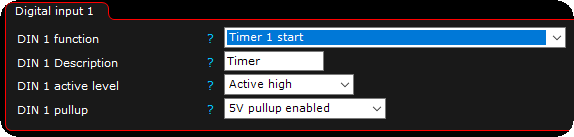
1. Enable the input where a button is wired, enable it as Timer 1 start.

2. the Inputs --> Timer settings page is now available in MTune, set timer mode and max timer value to suit your need, in this example the timer will start to count when switch is pressed and count to 300seconds, in case of a switch deactivation, the timer values will go back to 0.