Generic can
output protocol
Specifies which output protocol to be used.
•Disabled - No default CAN protocol is transmitted.
•MaxxECU Default 1.2 - MaxxECU default CAN data protocol to be transmitted, for example connection to external Dash loggers (AIM, RaceTech eg).
•MaxxECU Default 1.3 - MaxxECU default CAN data protocol to be transmitted, for example connection to external Dash loggers (AIM, RaceTech eg).
•KMS CAN display - KMS CAN Display.
CAN bus (output protocol)
Specifies which CAN bus to transmit/receive data on (only visible when more than one CAN Bus line exist in the connected MaxxECU).
CAN ID OFFSET
Specifies an offset value to be added to the above protocol IDs. Both positive and negative values can be used.
Note: Just be careful and make sure you know you are doing :)
Example CAN ID OFFSET usage
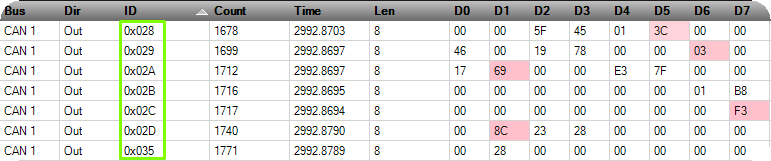
KMS CAN Display protocol output, with not offset added.
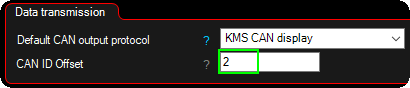
Example offset of "2".

KMS CAN Display protocol output, with not offset "2".
message rate
Available for the default v1.3 protocol.
•Default (10/50Hz) - 10Hz for the SLOW packages, and 50Hz for the FAST packages.
•User settings - Set custom rate for SLOW/FAST packages.
slow package rate
Sets the speed of all the SLOW packages.
FAST package rate
Sets the speed of all the FAST packages.
Note: To determine which are SLOW/FAST packages, see MaxxECU Default CAN output page.
User channels
Defines which RealTime Data channels should be transmitted on the Generic CAN protocols user channels, see MaxxECU Default CAN output.
ODB-II
OBD-II over can
Enables or disables OBD-II data output on the CAN bus, allowing external diagnostic tools to read supported diagnostic parameters.
Note: MaxxECU supports OBD-II data output for non-emissions diagnostic data only; it does not perform readiness monitoring, report diagnostic codes, or control MIL, and must not be used for emissions testing.

When CAN OBD-II is enabled, a new setting page under CAN Bus is visible with some options.
CAN bus (OBD-II)
Selects which CAN bus is used for OBD-II communication (transmit and receive).
Vehicle CAN integration
Enables OEM Vehicle CAN integration for supported vehicles together with options to disable certain inputs, coding options and wheel speed corrections.
use brake switch
Enabled by default. Uses the brake switch signal from the active vehicle, powertrain, or piggyback integration protocol. Can be disabled to ignore the protocol-provided brake switch input.
Use clutch switch
Enabled by default. Uses the clutch switch signal provided by the active vehicle, powertrain, or piggyback integration protocol. Can be disabled to ignore the protocol input.
Use vehicle/wheel speed
Enabled by default. Uses vehicle or wheel speed data from the active vehicle, powertrain, or piggyback integration protocol instead of a direct ECU input.
Use ESP/DSC button
Enabled by default. Uses the ESP/DSC button signal from the active vehicle integration protocol. Can be disabled to ignore the protocol input.
Use AC switch
Enabled by default. Uses the A/C request switch signal from the active vehicle or powertrain integration protocol. Can be disabled to ignore the protocol input.
Use Cruise Buttons
Enabled by default. Uses cruise control button inputs from the active vehicle integration protocol. Can be disabled to ignore the protocol inputs.
vehicle model integration
MaxxECU support the following OEM vehicle integrations:
•Audi A4 B7 VAG PL47 2006 (MED 9.1)
•Audi RS6 C5 VAG PL45 (ME 7.1.1)
•Audi S3 1.8T 2003 VAG PQ34 (ME 7.5)
•Audi S3 8P VAG PQ35/36 2010 (MED 9.1)
•Audi S4 B6 VAG PL46 (ME 7.1.1)
•Ford Focus RS/ST 2005 - 2012 (ME 9.0)
•Nissan Patrol TB48 Y61 (ME C23)
•Porsche Boxster 2003 with PSM (ME 7.8)
•Skidoo 900R 2022 (Bosch MG1C)
•Skidoo 900R 2024 (Bosch MG1C)
•Skidoo 900T 2019-2022 (Bosch ME17.8.5)
•Volvo ME 7.0.1 (250kbit) BETA
•VW Golf MK5 R32 MT VAG PL46.
•VW Passat 3C (R36) VAG PQ36 2008 (MED 9.1).
•VW Polo IV (9N3) GTI CUP PQ34 (ME 7.5)
Note: this list will be updated as we extend our support for other vehicles (based on demand).
CAN bus (vehicle model)
Selects which vehicle can integration (transmit and receive) to use on the selected bus.
Instr. cluster fuel flow correction.
Used to correct MaxxECU fuel consumption sent to the OEM dash, make sure to calibrate the MaxxECU fuel consumption before even try to adjust this value.
Note: only available on the supported OEM CAN protocols, so this settings might not be visible for your OEM CAN.
Wheel speed correction.
Used to correct the wheel speed coming from OEM ABS system (not available on all protocols) into the MaxxECU when an OEM CAN protocol is activated.
Verify and adjust the correction (%) value using an GPS or similar to make sure the wheel speed in MaxxECU is accurate.
Note: Make sure to enter correct wheel circumference in Speed/Gear --> Wheel setup before attempting to adjust this correction value.
Coding option
Used by some OEM CAN protocols to configure vehicle-specific coding, for example to ensure compatibility with systems such as ABS or traction control.
Powertrain integration
Selects which powertrain protocol to use on the selected CAN bus. Can be combined with other protocols, but check the CAN list for possible ID conflicts that may cause erratic behavior or malfunction.
•BMW DCT (GS7D36SG) transmission control.
•CANTCU.
•VAG Automatic pre 2012 (DQ250/DQ500/ZF 5HP) TCU control.
Note: Be sure to check each enabled protocol documentation and the CAN list and look for potential collision.
CAN bus (powertrain integration)
Selects which CAN bus is used for powertrain integration (transmit and receive).
piggyback integration
Selects which piggyback protocol to use on the selected CAN bus (transmit and receive). Currently only for internal development.
CAN bus (piggyback integration)
Selects which CAN bus is used for piggyback integration (transmit and receive).
•Audi RS6 C7 (Dev) - Captures VSS_GEAR, drive modes and torque values to debug channels.
•BMW G80 (dev) - Captures TPS, CLT, oil temp, VSS_GEAR, VSS_SPEED to debug channels.
Note: Do not use any of these settings other than instructed, it is currently in development.
peripheral integration
peripheral integration protocol
Selects which peripheral integration protocol to use on the selected CAN bus (transmit and receive).
•BMW E9x EKPM (Fuel Pump Control Module)
•BMW E85 EKPM (Fuel Pump Control Module)
•Ecutek RaceRom9 Port Injection
CAN bus (peripheral)
Selects which CAN bus is used for peripheral integration (transmit and receive).
Shifter integration
Do NOT enable this option if a CAN shifter is already configured in any active powertrain protocol.
shifter Integration protocol
When activated, the RealTime Data value CAN Shifter Selector Position is updated with position/button data.
Note: The needed CAN messages to wakeup the shifter is automatically transmitted, so pay attention for CAN collisions, see CAN list.
CAN bus (shifter)
Selects which CAN bus is used for shifter integration (transmit and receive).
•BMW Fxx DCT
Transmitted CAN ID: 0x12F, 0x3FD, 0x202, 0x293, 0x393, 0x328. Receive CAN ID: 0x197.
Note: Do not activate in combination with the GEN2 DCT.
CAN Shifter Selector Position Data |
Position |
0 |
Not engaged |
1 |
Mode change |
2 |
Reverse |
4 |
Neutral |
8 |
Upshift |
16 |
Downshift |
32 |
Drivelogic UP |
64 |
Drivelogic Down |
Example how to setup a BMW M4 DCT shifter with the DSG control

Example how to setup an Internal output to trigger the Transmission Neutral Switch.

Example how to setup an Internal output to trigger the DCT/DSG Mode Switch.
Do the same for the Transmission Reverse Switch, Transmission UP shift, Transmission DOWN shift

Setup the Shifter emulation in DSG settings.