PDM output functions
•Up to 4 outputs can have the same function set.
•Running multiple outputs for the same function will increase the available current.
Note: If you need ex 40A in total for something, set two 20A outputs in parallel (2x20A)
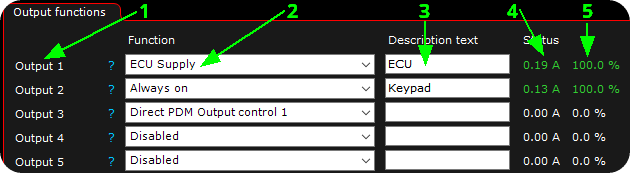
1. Output pin.
2. Output function.
3. Extra description.
4. Power consumption (in ampere) on the specified output.
5. The output duty (0 -100%) of the specified output.
Available PDM output functions
•Always on (no wakeup pulse in low power mode)
•ECU auxiliary supply, power hold
•Horn
Note: if no output is set as ECU supply, during PDM power on, PDM OUT 1 is automatically assigned as ECU SUPPLY, unless the safety function is disabled in PDM settings, Force one output to ECU supply = disabled.
reset output faults
Pressing the reset output faults will clear and reset all stored output faults stored in the PDM.
Examples
Activate a PDM output at MaxxECU vehicle speed above 200km/h and flash turn signals (hazard)
(the above example assumes you have vehicle speed correctly configured in MaxxECU)
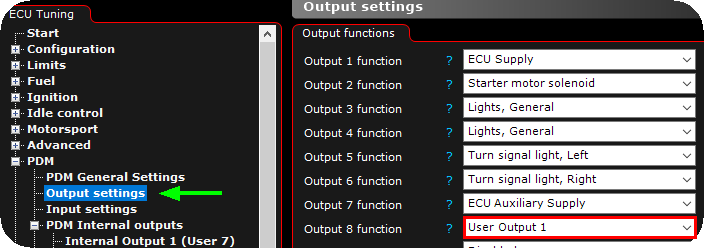
1. Enable a user output on the wired PDM output.
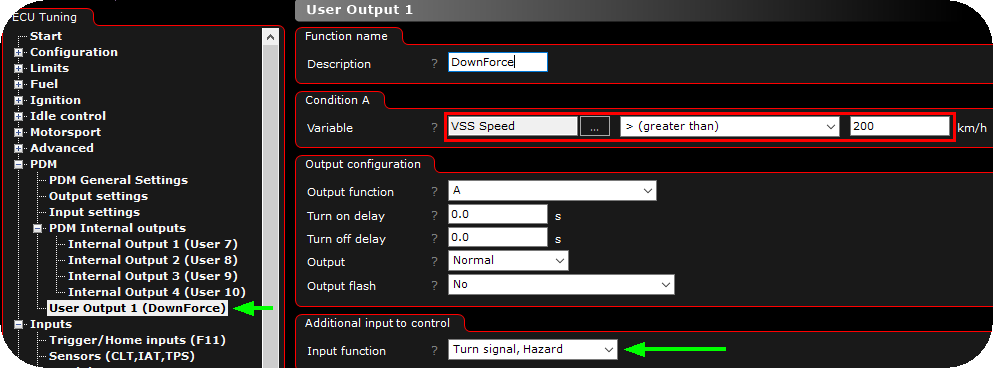
2. Name the output function properly, set condition to suit your need, and optionally you can trigger a PDM digital input.