trigger pattern generator
enable
Enable or disables the trigger pattern generator output function.
rpm source
•Analog input, 100.0 = max RPM - Uses the analog input Pattern generator rpm active on a User table. Uses a linear scaling from 0 to 100.0 where 100.0 is the below max rpm.
•can/system input, value = rpm - Uses the analog input Pattern generator rpm active on a User table, CAN Inputs where the direct RPM can be set.
•slider - Use the below slider as RPM source.
•engine RPM (not synchronized) - Uses the Engine RPM from MaxxECU, but not synchronized, cannot be used to send RPM signal to an OEM ECM for fuel/ign since it is NOT synchronized.
max rpm
Specifies the MAX RPM the pattern generator can output. Nothing can bypass this rpm value.
pattern
Which output pattern to generate from the list.
invert trigger
Invert the TRIGGER output.
invert cam
Invert the CAM/HOME output.
Example
Using the slider as RPM source
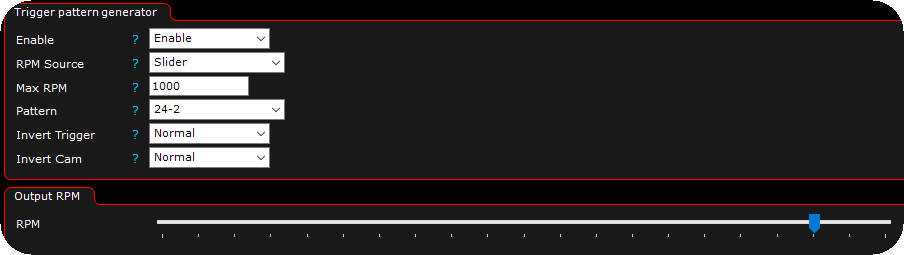
In the above example, we use the slider to output a 24-2 trigger pattern at approx ~800RPM, the slider is 0-100% of the Max RPM value.
Using an analog input as RPM source
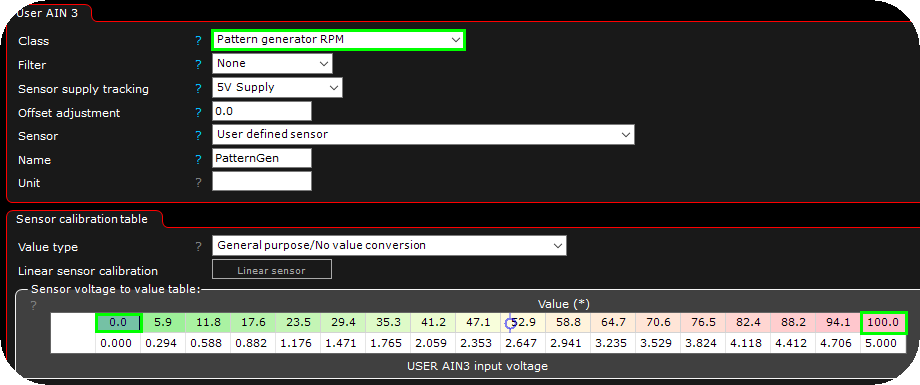
1. Wire an analog and enable it as pattern generator rpm and calibrate the output to 0-100%.
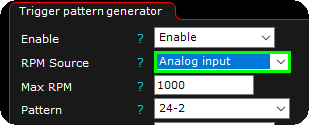
2. Select analog input as RPM source, depending on your calibration, the output will move from 0 to 1000RPM.