Complete, ready-to-use scripts demonstrating common tasks. Copy, adapt, and deploy.
Example 1: Reading CAN Sensors into AIN Functions
Scenario: You have two sensors on the CAN bus; an oil pressure sensor sending on ID 0x320 (big-endian, 16-bit value in bytes 0–1) and an ethanol content sensor sending on ID 0x410 (little-endian, 16-bit value in bytes 2–3).
Both use 0.1 scaling (i.e., raw value 985 = 98.5 in real units). The values are fed into Script AIN 1 and Script AIN 2, which you configure in MTune to be Engine Oil Pressure and Ethanol sensor respectively.
If no valid CAN message is received within 500 ms, the value reverts to a safe failsafe (0).

1. Assign Engine Oil Pressure to script controlled AIN function 1 and Ethanol sensor to script AIN 2 function.
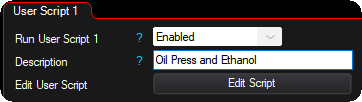
2. Enable the user script and provide a clear description to easily identify its function.
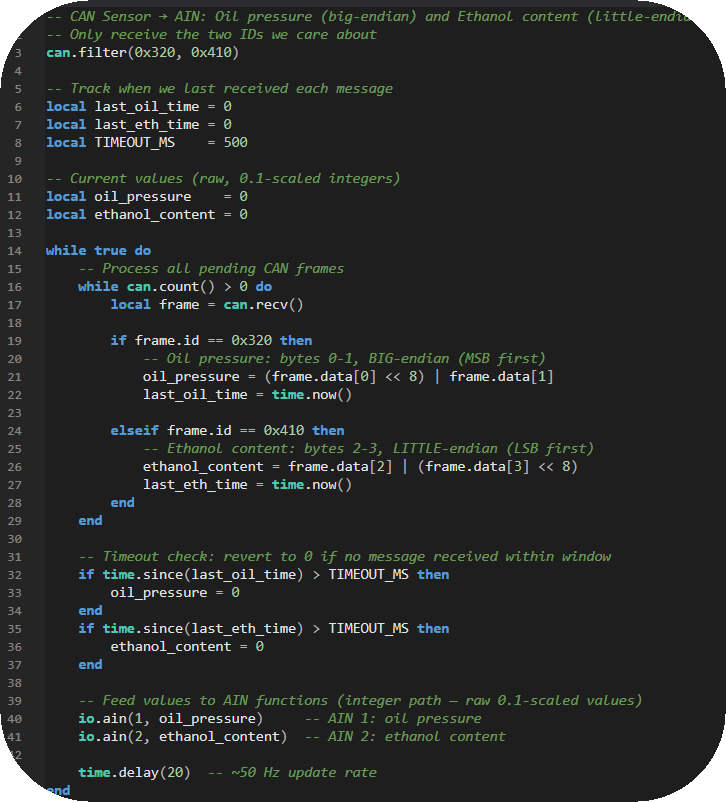
3. Press Edit Script to open the LUA code editor.
Lua code:
-- CAN Sensor → AIN: Oil pressure (big-endian) and Ethanol content (little-endian)
-- Only receive the two IDs we care about
can.filter(0x320, 0x410)
-- Track when we last received each message
local last_oil_time = 0
local last_eth_time = 0
local TIMEOUT_MS = 500
-- Current values (raw, 0.1-scaled integers)
local oil_pressure = 0
local ethanol_content = 0
while true do
-- Process all pending CAN frames
while can.count() > 0 do
local frame = can.recv()
if frame.id == 0x320 then
-- Oil pressure: bytes 0-1, BIG-endian (MSB first)
oil_pressure = (frame.data[0] << 8) | frame.data[1]
last_oil_time = time.now()
elseif frame.id == 0x410 then
-- Ethanol content: bytes 2-3, LITTLE-endian (LSB first)
ethanol_content = frame.data[2] | (frame.data[3] << 8)
last_eth_time = time.now()
end
end
-- Timeout check: revert to 0 if no message received within window
if time.since(last_oil_time) > TIMEOUT_MS then
oil_pressure = 0
end
if time.since(last_eth_time) > TIMEOUT_MS then
ethanol_content = 0
end
-- Feed values to AIN functions (integer path — raw 0.1-scaled values)
io.ain(1, oil_pressure) -- AIN 1: oil pressure
io.ain(2, ethanol_content) -- AIN 2: ethanol content
time.delay(20) -- ~50 Hz update rate
end
Notes:
•Big-endian (network byte order): MSB is at the lower byte index. (data[0] << 8) | data[1]
•Little-endian (Intel byte order): LSB is at the lower byte index. data[2] | (data[3] << 8)
•The io.ain() call uses the integer path here, so raw values pass through directly. If your sensor data uses a different scale, convert before calling io.ain() or use the float path (e.g., io.ain(1, 98.5) stores raw 985).
•AIN values must be refreshed at least every 100 ms or the ECU reverts them. The 20 ms loop here comfortably satisfies this.
Example 2: OEM CAN Button Toggle --> DIN Function + CAN LED
Scenario: An OEM steering wheel button sends a momentary CAN signal (bit 2 of byte 4 on ID 0x290 goes high while pressed).
You want this to toggle the AC compressor on/off using DIN function slot 1 (configured as AC request/idle up in MTune). Additionally, the AC state should be sent back to the OEM instrument cluster LED on CAN ID 0x390 byte 0 bit 5.
Lua code:
-- OEM CAN button toggle → DIN function (AC) + CAN LED feedback
can.filter(0x290)
local ac_on = false -- latched AC state
local prev_button = false -- previous button state for edge detection
-- Pre-build the LED feedback frame
local led_frame = can.frame(0x390, 1, {0x00, 0x00, 0x00, 0x00, 0x00, 0x00, 0x00, 0x00})
while true do
-- Process incoming CAN frames
while can.count() > 0 do
local frame = can.recv()
if frame.id == 0x290 then
-- Extract button state: byte 4, bit 2
local button = ((frame.data[4] >> 2) & 1) == 1
-- Toggle on rising edge (button just pressed)
if button and not prev_button then
ac_on = not ac_on
end
prev_button = button
end
end
-- Drive the DIN function continuously (ECU expects a steady signal)
io.din(1, ac_on)
-- Send LED state to cluster: byte 0, bit 5
if ac_on then
led_frame.data[0] = led_frame.data[0] | (1 << 5) -- set bit 5
else
led_frame.data[0] = led_frame.data[0] & ~(1 << 5) -- clear bit 5
end
can.send(led_frame)
time.delay(50) -- 20 Hz update rate for DIN + LED
end
Key concepts:
•Rising edge detection: The "if button and not prev_button" pattern fires only once when the button transitions from released to pressed, converting a momentary press into a toggle.
•Continuous DIN output: io.din() is called every loop iteration because the ECU DIN function expects a steady on/off signal, not a single pulse.
•Bit manipulation: (byte >> n) & 1 extracts bit "n". byte | (1 << n) sets bit "n". byte & ~(1 << n) clears bit "n".
Example 3: Send ECU RT-Values Over CAN
Scenario: Transmit 6 real-time values to a dashboard or logger over CAN.
Two CAN frames are used (3 values per frame, each as a 16-bit raw integer, big-endian):
- Frame `0x600` (bus 1): MAP, RPM, TPS
- Frame `0x601` (bus 1): Engine Oil Pressure, Fuel Level, Fuel Temperature
Values are read as raw integers via ecu.get() and sent with no additional scaling.
Lua code:
-- Send 6 RT-values over CAN (raw integers, big-endian, no scaling)
-- Pre-build TX frames
local frame1 = can.frame(0x600, 1, {0,0,0,0,0,0,0,0})
local frame2 = can.frame(0x601, 1, {0,0,0,0,0,0,0,0})
-- Helper: pack a 16-bit integer into two bytes at a given offset (big-endian)
local function pack_int16(frame, offset, value)
-- Clamp to unsigned 16-bit range for safe byte splitting
if value < 0 then value = 0 end
if value > 65535 then value = 65535 end
frame.data[offset] = (value >> 8) & 0xFF -- high byte
frame.data[offset + 1] = value & 0xFF -- low byte
end
while true do
-- Read raw integer RT-values
local map_val = ecu.get(RTDATA.MAP)
local rpm_val = ecu.get(RTDATA.RPM)
local tps_val = ecu.get(RTDATA.TPS)
local oil_press = ecu.get(RTDATA.ENGINE_OIL_PRESSURE)
local fuel_level = ecu.get(RTDATA.FUEL_LEVEL)
local fuel_temp = ecu.get(RTDATA.FUEL_TEMPERATURE)
-- Pack into frame 1: MAP (bytes 0-1), RPM (bytes 2-3), TPS (bytes 4-5)
pack_int16(frame1, 0, map_val)
pack_int16(frame1, 2, rpm_val)
pack_int16(frame1, 4, tps_val)
-- Pack into frame 2: Oil (bytes 0-1), Fuel Level (bytes 2-3), Fuel Temp (bytes 4-5)
pack_int16(frame2, 0, oil_press)
pack_int16(frame2, 2, fuel_level)
pack_int16(frame2, 4, fuel_temp)
-- Transmit both frames
can.send(frame1)
can.send(frame2)
time.delay(50) -- 20 Hz broadcast rate
end
Notes:
•ecu.get() returns the raw integer value (no unit conversion). This is ideal when the receiving device applies its own scaling.
•Bytes 6–7 of each frame are unused (zero-filled).
•Adjust the time.delay() to change the broadcast rate. 50 ms = 20 Hz is a good balance for dashboard updates. For data logging you may want 10–20 ms.
Example 4: Differential Cooler Control (Pump + PWM Fan)
Scenario: A differential oil cooler system with two outputs:
•Pump (script output 1): Simple on/off. Turns on when diff oil temp exceeds 60 °C, turns off below 55 °C (5 °C hysteresis to prevent rapid cycling).
•Fan (script output 2): PWM-controlled. Ramps from 0% at 60 °C to 100% at 100 °C. Frequency: 100 Hz.
The differential oil temperature is read from RTDATA.DIFFERENTIAL_OIL_TEMP.
Lua code:
-- Differential cooler control: pump on/off + fan PWM
-- Configuration
local PUMP_ON_TEMP = 60.0 -- pump activates above this (°C)
local PUMP_OFF_TEMP = 55.0 -- pump deactivates below this (°C)
local FAN_MIN_TEMP = 60.0 -- fan starts ramping here (°C)
local FAN_MAX_TEMP = 100.0 -- fan reaches 100% here (°C)
local FAN_FREQ = 100 -- fan PWM frequency (Hz)
local PUMP_OUTPUT = 1
local FAN_OUTPUT = 2
-- Helper: linearly map a value from one range to another, with clamping
local function map_range(x, in_min, in_max, out_min, out_max)
if x <= in_min then return out_min end
if x >= in_max then return out_max end
return out_min + (x - in_min) * (out_max - out_min) / (in_max - in_min)
end
local pump_on = false
while true do
local diff_temp = ecu.getf(RTDATA.DIFFERENTIAL_OIL_TEMP)
-- Pump control with hysteresis
if diff_temp >= PUMP_ON_TEMP then
pump_on = true
elseif diff_temp <= PUMP_OFF_TEMP then
pump_on = false
end
-- (between PUMP_OFF_TEMP and PUMP_ON_TEMP, pump_on retains its previous state)
io.set(PUMP_OUTPUT, pump_on)
-- Fan PWM: ramp from 0% to 100% across the temperature range
local fan_duty = 0.0
if pump_on then
fan_duty = map_range(diff_temp, FAN_MIN_TEMP, FAN_MAX_TEMP, 0.0, 100.0)
end
io.pwm(FAN_OUTPUT, fan_duty, FAN_FREQ)
-- Also publish the duty cycle to a script RT-value for logging
ecu.set(1, fan_duty)
time.delay(250) -- 4 Hz is plenty for thermal control
end
Key concepts:
•Hysteresis prevents the pump from rapidly switching on and off when the temperature hovers near the threshold. With a 5 °C gap, the pump turns on at 60 °C and won't turn off until it drops to 55 °C.
•Linear PWM ramp gives proportional cooling. At 80 °C the fan runs at 50%. At 100 °C it's at full speed.
•Fan only runs when pump is on. No point running the fan if coolant isn't flowing.
•ecu.set(1, fan_duty) publishes the fan duty cycle to Script RT-value 1, so you can see it in MTune logging and verify the behavior.
•250 ms loop is appropriate for thermal control; temperature changes slowly and there's no benefit to faster updates.
Tips and Patterns
Periodic Tasks at Different Rates
If you need some things to run fast and others slow in the same script:
Lua code:
local fast_timer = time.now()
local slow_timer = time.now()
while true do
-- Fast task: 50 Hz (every 20 ms)
if time.since(fast_timer) >= 20 then
fast_timer = time.now()
-- process CAN, update AINs, etc.
end
-- Slow task: 2 Hz (every 500 ms)
if time.since(slow_timer) >= 500 then
slow_timer = time.now()
-- send status CAN frame, update logging, etc.
end
yield()
end
Debugging with print()
The Monitor window shows print() output. Use it liberally during development:
Lua code:
-- Print CAN frames
local frame = can.recv()
if frame then
print(tostring(frame)) -- e.g., CAN(bus=1 id=0x320 dlc=8 data=[0x03 0xE8 ...])
end
-- Print formatted values
print(string.format("Temp=%.1f Duty=%.1f%%", temp, duty))
Safe Startup
Put filter setup and initialization before your main loop:
Lua code:
-- ===== INITIALIZATION =====
can.filter(0x320, 0x410)
local pump_on = false
local last_msg = time.now()
-- ===== MAIN LOOP =====
while true do
-- your logic
yield()
end
For more information about the MaxxECU user scripts, see User Scripts (LUA), or directly reference the LUA api reference and LUA examples. For more all available LUA settings and options, see Script Code, Script Input Control, Output Functions and Script RT values.