user script outputs
script out x name
Defines a custom name for the user script output to easily identify its function.
User script output (io.set / io.pwm) example - activate a cooling fan based on temperature
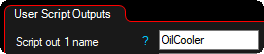
1. Navigate to Advanced --> User Scripts --> Output Functions, Set the user script output name, used to to easily identify its function.

2. Navigate to Outputs --> Output Config, assign the Script out X on the physical output, now available through the lua script function io.set(1,true/false)
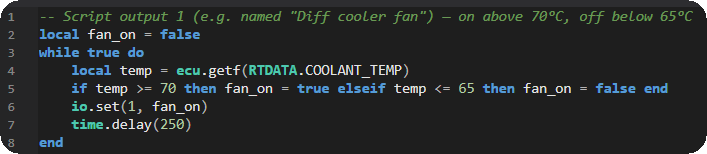
3. Navigate to Advanced --> User Scripts --> Script Code, edit user script button and enter your LUA code.
LUA code:
-- Script output 1 (e.g. named "Diff cooler fan") — on above 70°C, off below 65°C
local fan_on = false
while true do
local temp = ecu.getf(RTDATA.COOLANT_TEMP)
if temp >= 70 then fan_on = true elseif temp <= 65 then fan_on = false end
io.set(1, fan_on)
time.delay(250)
end
Code explanation:
local fan_on = false - Stores the current fan state.
ecu.getf(RTDATA.COOLANT_TEMP) - Reads coolant temperature from real-time data.
if temp >= 70 - Activates the fan when temperature reaches 70 °C or higher.
elseif temp <= 65 - Deactivates the fan when temperature drops to 65 °C or lower. The 70/65 °C gap creates hysteresis, preventing the output from rapidly toggling near the threshold.
io.set(1, fan_on) - Sets Script Output 1 to the calculated state.
time.delay(250) - Updates the control every 250 ms.
For more information about the MaxxECU user scripts, see User Scripts (LUA), or directly reference the LUA api reference and LUA examples. For more all available LUA settings and options, see Script Code, Script Input Control, Output Functions and Script RT values.