user script Realtime data values
RT-val X name
Defines a custom name for a user-defined RealTime Data value created by the user script. The value becomes available throughout the MaxxECU system and can be used in conditions, outputs, axis selections, and 4D table axes.
RT-val X unit
Defines the custom unit for the user-defined RealTime Data value created by the user script. The unit is used throughout the MaxxECU system wherever the RT value is referenced.
RT-val X Scale
Defines the scaling to apply to the user-defined RealTime Data value created by the user script. The scale determines how the value is represented and displayed throughout the MaxxECU system.
User script RT-value (ecu.set) example - Publish a calculated value for logging.

1. Navigate to Advanced --> User Scripts --> Script RT-Values. and configure the name, unit, and scale for each RT-Value you want to use.
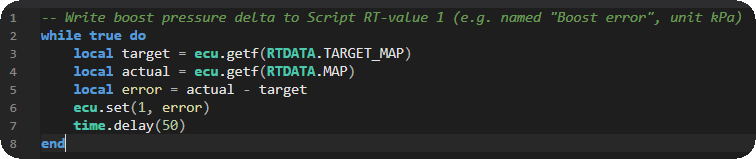
2. Navigate to Advanced --> User Scripts --> Script Code, edit user script button and enter your LUA code.
LUA code:
-- Write boost pressure delta to Script RT-value 1 (e.g. named "Boost error", unit kPa)
while true do
local target = ecu.getf(RTDATA.TARGET_MAP)
local actual = ecu.getf(RTDATA.MAP)
local error = actual - target
ecu.set(1, error)
time.delay(50)
end
Code explanation:
ecu.getf(RTDATA.TARGET_MAP) - Reads the target manifold pressure (boost target).
ecu.getf(RTDATA.MAP) - Reads the actual manifold pressure.
actual - target - Calculates the boost error (pressure delta). Positive value → boost above target Negative value → boost below target
ecu.set(1, error) - Writes the calculated value to Script RT value 1 (e.g., “Boost error”).
time.delay(50) - Updates the value every 50 ms.
For more information about the MaxxECU user scripts, see User Scripts (LUA), or directly reference the LUA api reference and LUA examples. For more all available LUA settings and options, see Script Code, Script Input Control, Output Functions and Script RT values.