user script din function control
script controlled din function x
Defines which ECU digital input function to assign to each script DIN slot, controllable via io.din().
Example LUA user script to activate the AC request digital input from CAN bit

1. Assign the AC request/idle up digital input function on the user script DIN function 1. This input can then be set from the user script using io.din(1, true/false).
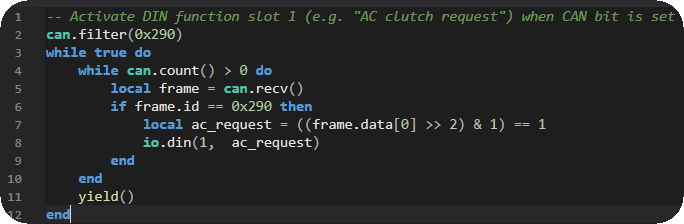
2. This code will filters and reads CAN message 0x290, extracts the A/C request bit (bit 2 in byte 0), and set the AC request/idle up digital input to active.
LUA code:
-- Activate DIN function slot 1 (e.g. "AC clutch request") when CAN bit is set
can.filter(0x290)
while true do
while can.count() > 0 do
local frame = can.recv()
if frame.id == 0x290 then
local ac_request = ((frame.data[0] >> 2) & 1) == 1
io.din(1, ac_request)
end
end
yield()
end
Note: If the CAN message stops being received, the digital input may remain in its last state and appear "stuck" until a new message updates it.
Code explanation:
can.filter(0x290) - Only accept CAN frames with ID 0x290.
can.recv() - Reads received CAN frames from the buffer.
((frame.data[0] >> 2) & 1) - Extracts bit 2 from the first data byte.
io.din(1, ac_request) - Sets Digital Input 1 to true/false depending on the A/C request bit.
yield() - Yields execution to allow other ECU tasks to run.
user script AIN function control
script controlled AIN function x
Defines which ECU analog input sensor function to assign to each script AIN slot, controllable via io.ain().
Example LUA user script to capture oil pressure from CAN and insert into MaxxECU Oil pressure RealTime Data

1. Assign the Engine Oil Pressure analog input channel to the user script AIN function 1. This channel can then be updated from the user script using io.ain(1, pressure).
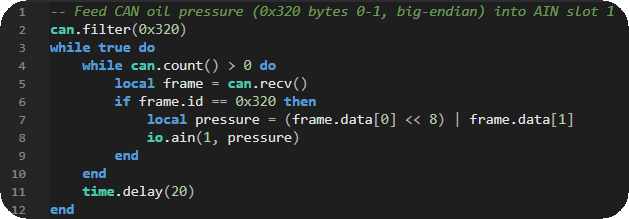
2. Reads CAN message 0x320, combines byte 0–1 (big-endian) into a 16-bit oil pressure value, and writes it to MaxxECU Engine Oil Pressure analog channel.
Note: When writing to analog channels, you need to pay attention to the resolution, in this case the Engine Oil Pressure is a 0.1 scaled value in the kPa unit.
LUA code:
-- Feed CAN oil pressure (0x320 bytes 0-1, big-endian) into AIN slot 1
can.filter(0x320)
while true do
while can.count() > 0 do
local frame = can.recv()
if frame.id == 0x320 then
local pressure = (frame.data[0] << 8) | frame.data[1]
io.ain(1, pressure)
end
end
time.delay(20)
end
Code explanation:
can.filter(0x320) - Only accept CAN frames with ID 0x320.
can.recv() - Reads received CAN frames from the buffer.
(frame.data[0] << 8) | frame.data[1] - Combines byte 0–1 into a 16-bit value (big-endian).
io.ain(1, pressure) - Feeds the calculated value into AIN channel 1.
time.delay(20) - Waits 20 ms before the next loop iteration.
For more information about the MaxxECU user scripts, see User Scripts (LUA), or directly reference the LUA api reference and LUA examples. For more all available LUA settings and options, see Script Code, Script Input Control, Output Functions and Script RT values.