MaxxECU VAG DSG DQ250/DQ500 transmission control support
VAG DSG related links
•VAG DSG (DQ250) wiring and hardware requirements.
•VAG DSG (DQ500) wiring and hardware requirements.
•DSG RealTime Data description.
NOTE: Do NOT activate the MaxxECU Default V1.3 CAN output on the same bus as the DSG, cause it will interfere with the control operation and cause trans going to neutral and random strange issues.
NOTE: PDM20 uses the 0x50 CAN message ID for communication, which might be available on some Audi (equipped with airbag modules), do NOT use on the same bus!
Changelog
•Fixed a bug in the DSG shifter emulation where a double triggered up/downshift could occur.
•Shift improvement.
•DQ500: Changed the brake pedal status to make Tiguan Diesel transmission TCU based tunes happy.
•DQ250: When enabled, uses the Brake pressure input for ABS emulation output pressure.
•DQ250/DQ500: Added more options for DSG blip delay (up to 150ms).
•Fixed a bug where the Sequential transmission blip delay setting interfered with the DSG blip delay function.
•DSG Shifter emulation added.
•Added option to disable TCU DIAG requests for the DQ500, and automatic stop of the requests if a diagnostic tool is present on the bus until next restart.
•Added VAG DSG option for CAN emulation.
•TCU diagnostic support for the DQ500 transmission.
•DQ500 support.
•Fixed a bug.
•Experimental support for DSG launch.
•Initial support for the DQ250 transmission.
Needed for the protocol to work
•DSG Torque table setup accurately.
•Brake input.
•Engine RPM.
•Throttle Position.
•VSS SPEED.
•Brake pressure sensor (optional).
•Intake air temperature.
•MAP
•Coolant temperature.
Also, see DSG Shifter emulation.
Note: The MaxxECU does NOT need to control the engine for the DSG control feature to work, the MaxxECU just needs to be aware of the above engine data values.
Standalone controller examples
Note: It is entirely possible, but please note that for the best experience, MaxxECU SHOULD control both the engine and the transmission.
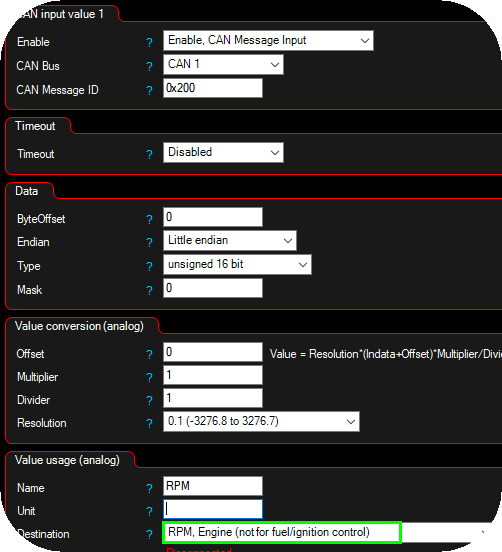
Example how to setup RPM from a CAN message.
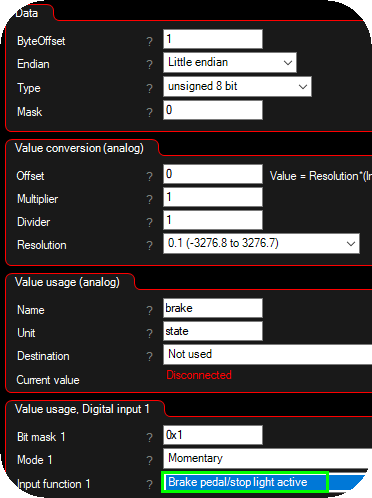
Example how to get brake pedal switch from CAN.
Reverse light output
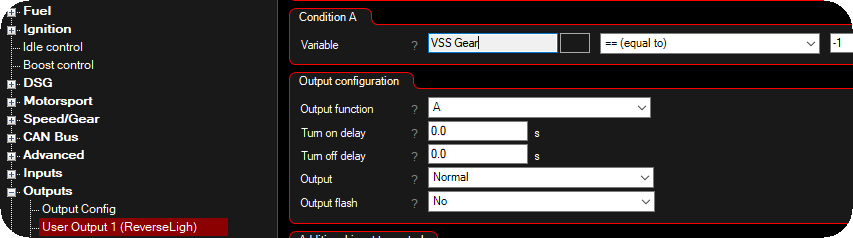
To activate an output when in reverse in the DSG control, set an output to User output and set a == (equal to) -1 condition using the VSS GEAR parameter.
This allows you to trigger functions such as reverse lights, rear cameras, or any custom output whenever reverse gear is selected.
Help an contribution on the DQ250
Amo, Exelixis Etuners (France)
Yannis Markakis, Markakis Ioannis & Georgia OE (Greece)
Toras Stamatis, STM Performance Service (Greece)
Help an contribution on the DQ500
Steffen Tille, Tille Motorsport Engineering
Daniel Hanebuth, TD-Motorsport (Germany)